Point of sale software for any business
One POS for your shop, restaurant, salon or workshop. Billing, stock, tables, kitchen, appointments and production on your PC and your phone. Works offline and syncs to the cloud.
Windows 10/11 or any phone · same free 14-day trial · no card needed · for shops, salons, workshops, factories & more
One POS. Switch on what your business does.
Restaurant, Salon & Spa and Factory are built in. Each one is OFF until you turn it on, so a normal shop never sees extra menus.
Watch it work
Short real walkthroughs, recorded in the app.
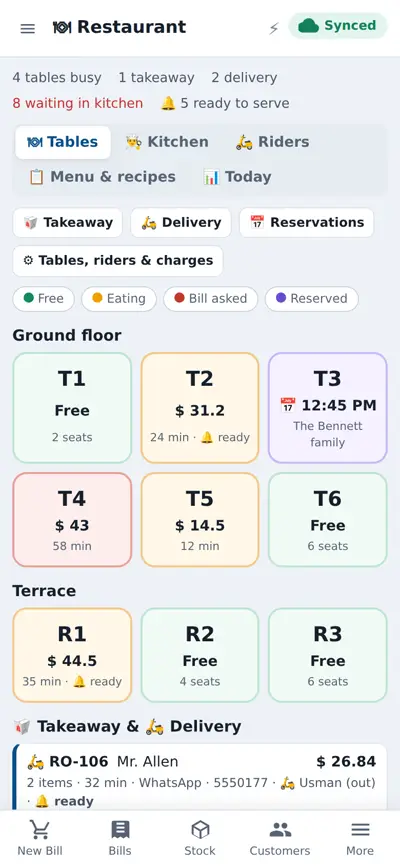
Tables, kitchen and bill: one smooth flow
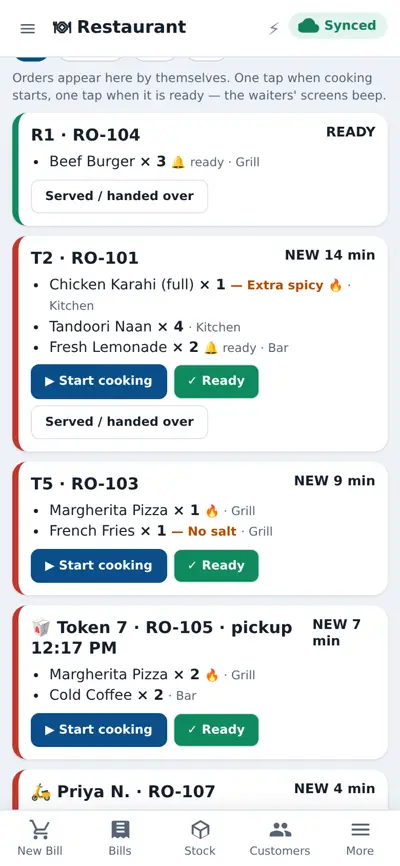
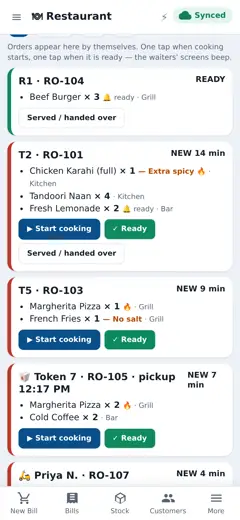
Tap a table, add dishes with notes like “extra spicy”, and send the order to the kitchen. The kitchen screen shows every order with a timer. When the chef taps Ready, the waiter hears a beep. Then bill and pay in one tap.
- Table map: free, eating, bill asked, reserved
- Kitchen screen with timers and a slow-order warning
- Service charge, GST and discounts worked out for you
- Cancel an item or order with a reason, so nothing disappears
Riders, delivery and takeaway tokens
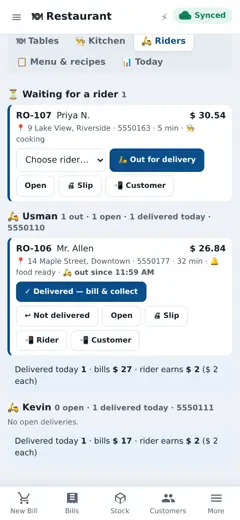
Take phone orders with the customer’s address and delivery zone. Pick a rider, tap Out for delivery, and the customer is told on WhatsApp. When the rider is back, tap Delivered and the bill is ready to collect cash.
- Delivery zones with their own charges
- Takeaway tokens and pickup time
- Rider list with orders out and earnings per rider
- Delivery slip and WhatsApp to rider or customer
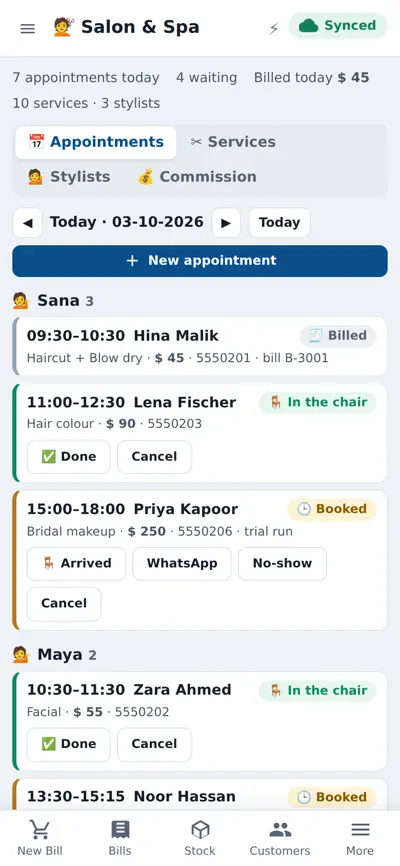
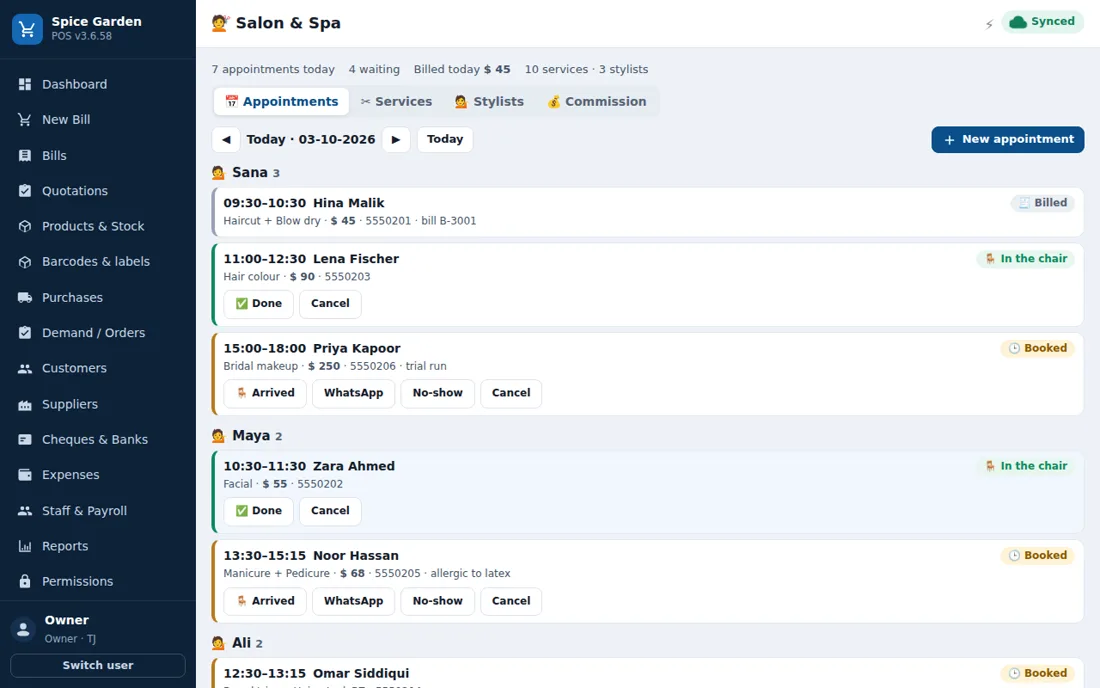
Appointments, stylists and commission
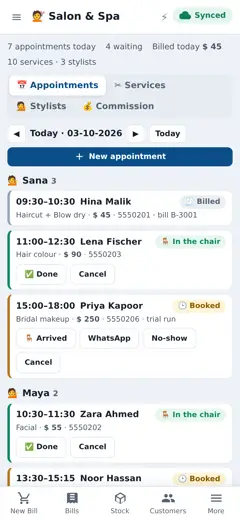
See every stylist and every booking for the day. Mark Arrived, then In the chair, then Done, and check out with a tip. The POS warns you if a stylist is already busy and sends a WhatsApp reminder to the customer.
- Services with time and price
- Day view grouped by stylist
- Tips and checkout in one tap
- Monthly commission for each stylist
Parts, bill of materials and production
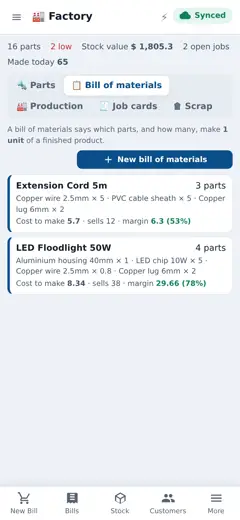
Keep parts and raw material, write a bill of materials for every product, and see the cost to make and your margin. Record production: parts go out of stock and finished goods come in. Job cards turn repair work into a customer bill.
- Bill of materials with cost to make and margin
- Production run takes parts out and puts goods in
- Job cards for repair work, then bill the customer
- Scrap and low-stock warnings
Everything is OFF until you switch it on
A new shop is asked “What does your business do?” once. Tick only what you need. A normal shop with only goods and bills leaves everything off and sees the same simple POS as before. Change it any time in Settings.
- One switch for each mode, owner only
- Nothing is deleted when you switch a mode off
- Smart tip suggests a mode if your items look like a restaurant, salon or workshop
- Modes follow your plan, so you only pay for what you use

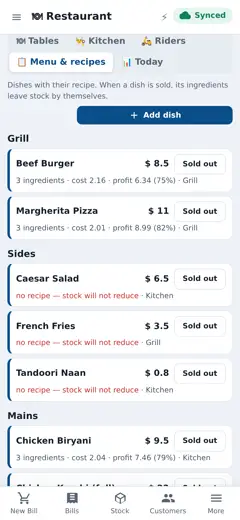
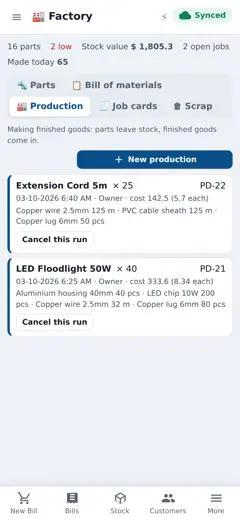
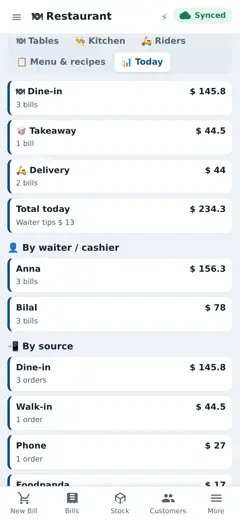
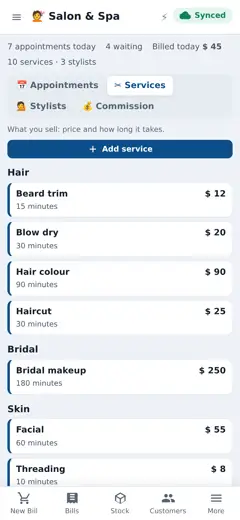
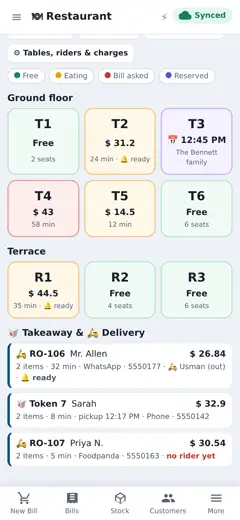
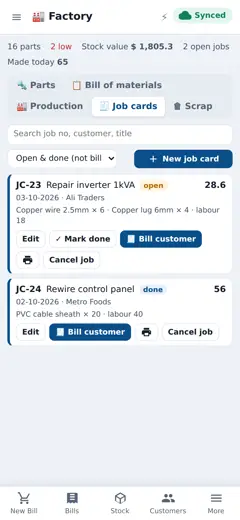
The same screens on every device
Use the PC at the counter, a tablet in the kitchen and phones for waiters and riders.
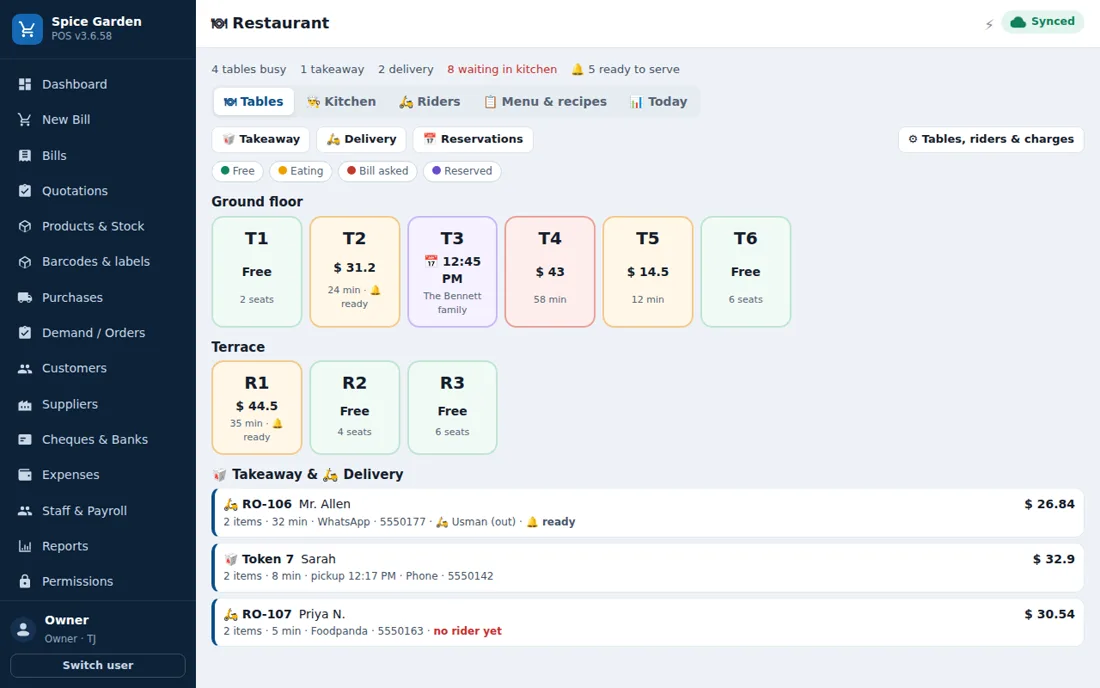
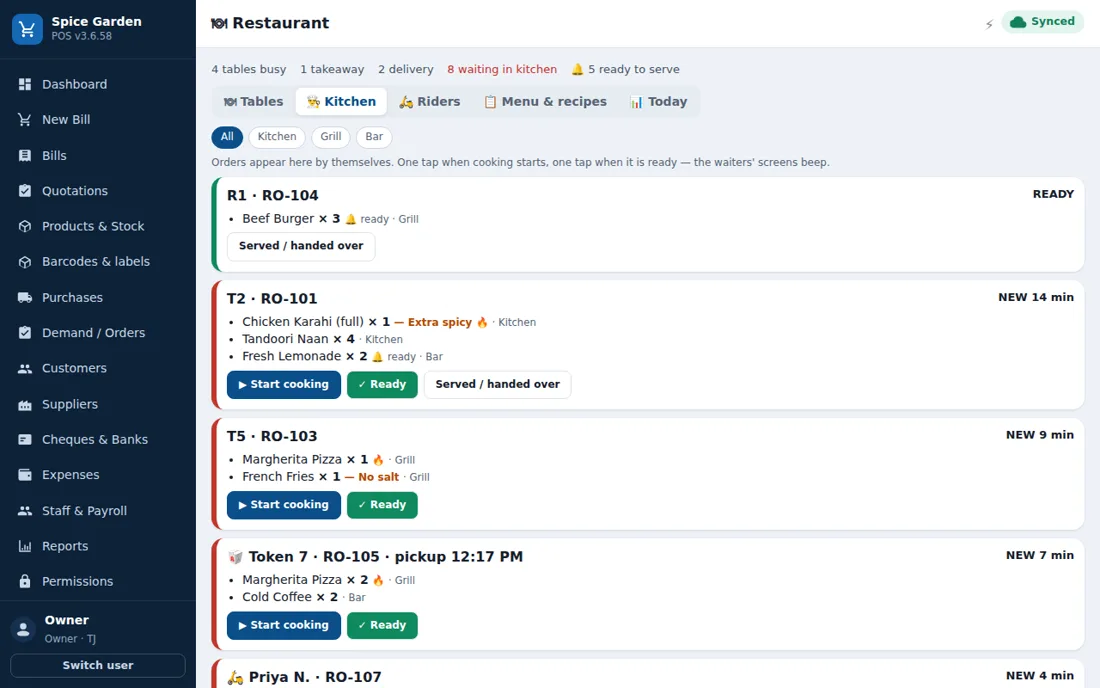
One POS, built for how your business works
Pick your business type to see how CloudSync POS fits.
Restaurants & cafés
Tables, kitchen screen, takeaway, delivery riders and recipes.
Learn moreRetail shops
Fast billing, barcodes and live stock for every kind of store.
Learn moreSalons & spas
Services, staff and customer history in one simple screen.
Learn moreFactories & workshops
Track parts, orders, customer credit and payments.
Learn moreOffline POS
Keep selling when the internet goes down. Sync later.
Learn moreEverything your counter needs, in one place
From the first bill of the day to the final report at night.
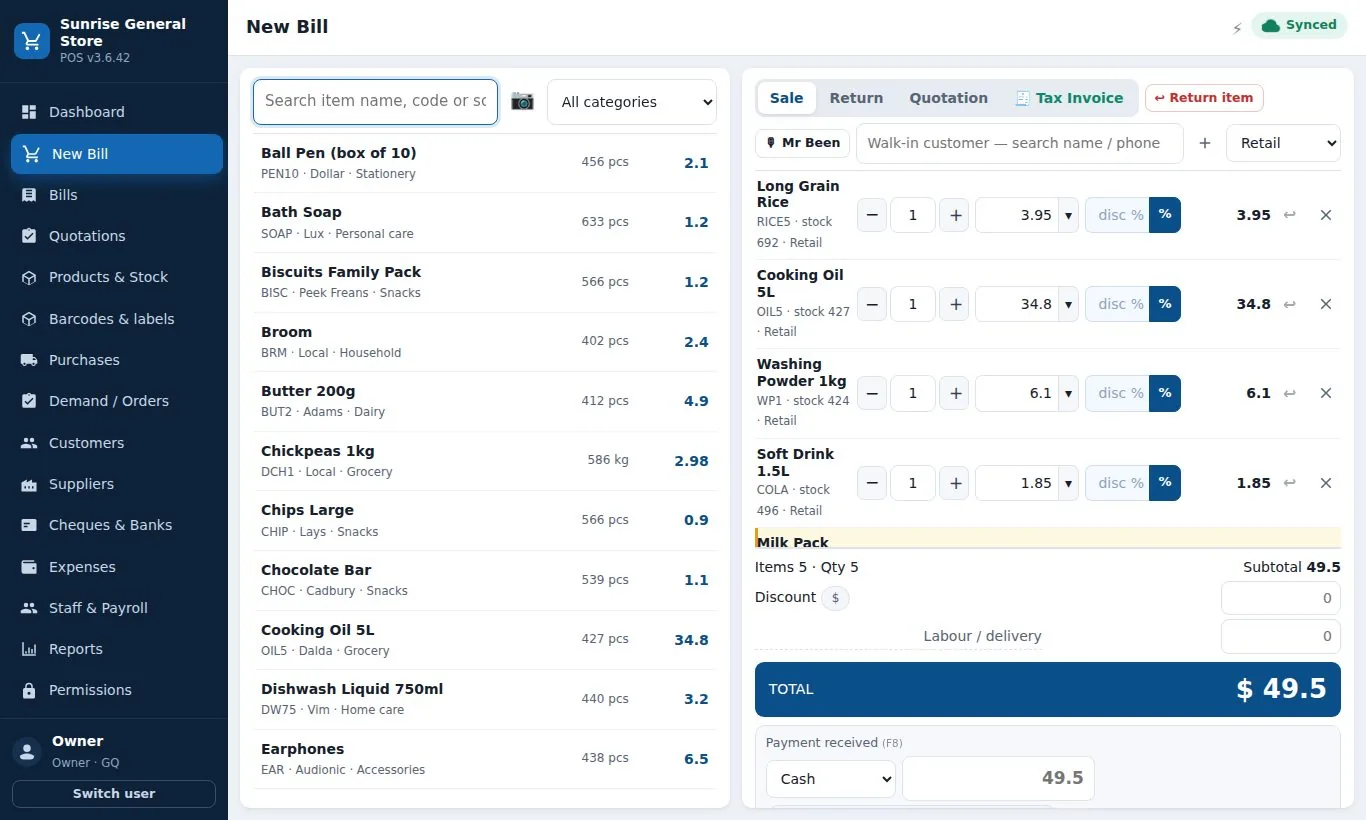
Fast billing software for the counter
Scan, search or tap. Create bills, returns, quotations and tax invoices in seconds, then print on any receipt printer or send the bill on WhatsApp.
- Barcode scanner and receipt printer support
- Returns, quotations and tax invoices
- Your logo and shop details on every bill
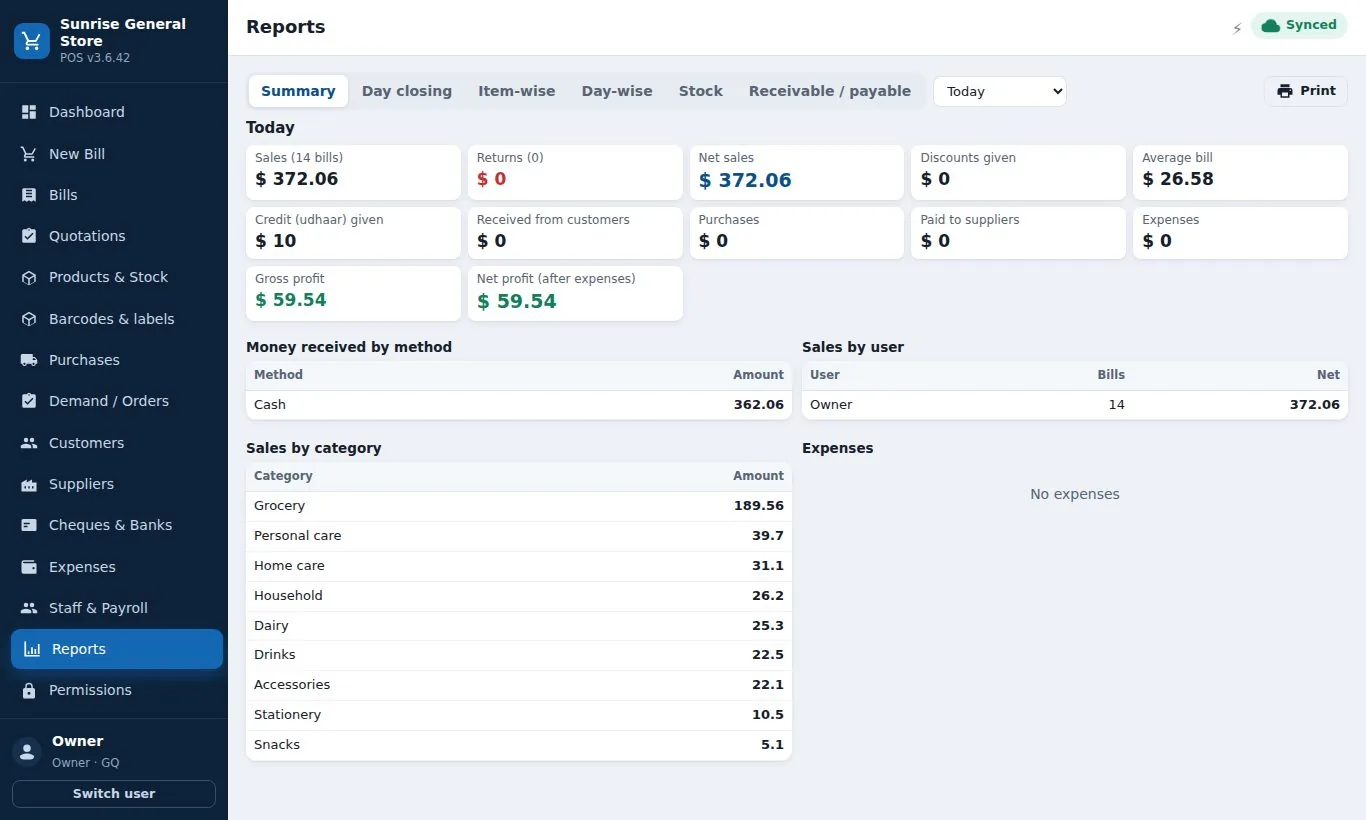
Know your profit every single day
See today’s sales, profit, best sellers, cash in hand and who owes you money. Clear numbers instead of spreadsheets, on PC or phone.
- Daily, weekly and monthly reports
- Customer accounts and statements
- Low-stock alerts before you run out
Billing & receipts
Discounts, returns and quotes in seconds.
Stock & barcodes
Live stock, purchases and printable labels.
Customer credit
Who owes what, with statements in one tap.
Reports
Clear daily sales and profit numbers.
Cloud sync
PC and phone stay in step.
Offline mode
Keep billing without internet.
WhatsApp bills
Send receipts to customers instantly.
Staff & security
Roles, approvals and restore points.
Your phone is a barcode scanner. Billing gets easier.
No scanner to buy. Open the billing screen, tap the camera and point it at any barcode. The item is found, shown with its price and stock, and added to the bill in one tap.
- Tap the cameraIt sits next to the search box on the billing screen.
- Point at the barcodeThe scan window reads it in a moment, with a beep and a small vibration.
- Add and keep scanningCheck name, price and stock, tap Add, then scan the next item. Switch on “Add at once” to skip the tap.
- Take paymentPrint the receipt or send the bill to your customer on WhatsApp.
- Works on Android and iPhone, in the phone’s browser
- Reads EAN, UPC, Code 128, Code 39 and QR codes
- Torch button for dark corners and a switch for the other camera
- Scan a printed bill’s barcode to open it for a return or reprint
A POS that finds and fixes its own problems
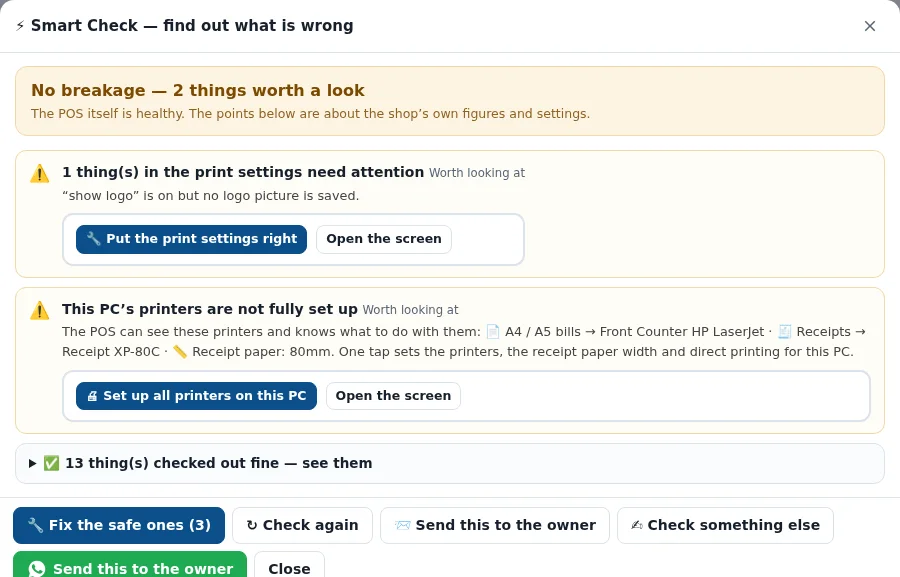
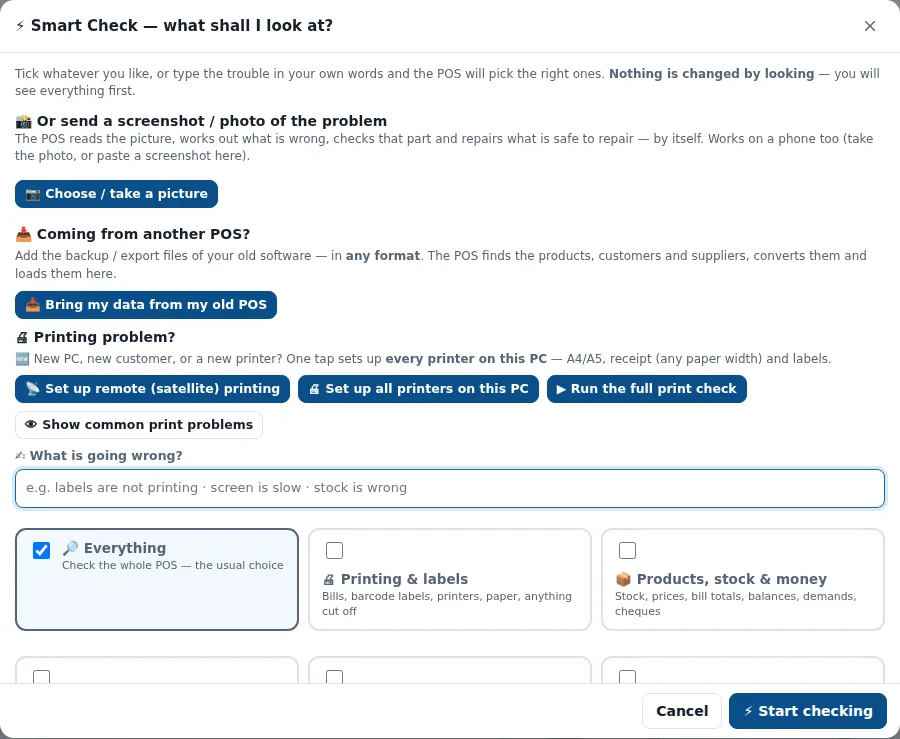
When something feels wrong, press ⚡ Smart Check. It looks at the internet, shop server, sync, printers, permissions and your stock and balance figures, tells you what it found in plain words and repairs the safe problems with one tap.
See what is wrong before anything is changed
Smart Check only looks first. You read a clear report, then choose which fixes to run. Cashiers and managers get the answer without calling for help, and the owner can receive the same report on WhatsApp in one tap.
- Checks internet, server, sync, device storage and clock
- Checks printers, paper size and barcode printing
- Checks permissions, stock, prices, bill totals and customer balances
- “Fix the safe ones” shows the exact list before it runs
Type it, tick it or send a picture
Describe the trouble in your own words, such as “labels are not printing” or “stock is wrong”. Or send a screenshot or a photo and Smart Check reads the picture, works out the cause and checks that part of the POS.
- Screenshot or photo diagnosis on PC and phone
- One tap to set up every printer on a new PC: A4, A5, receipt and labels
- Bring your data from another POS or Excel, in almost any file format
- Remembers what it repaired and warns if a fix did not hold
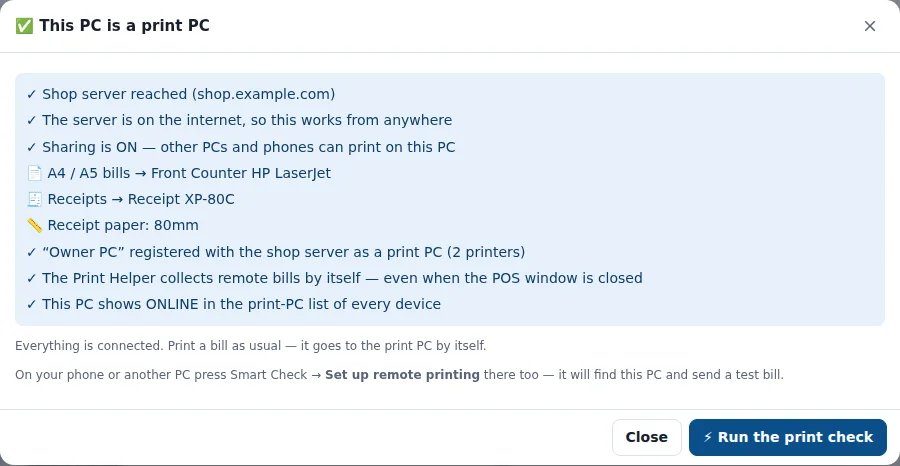
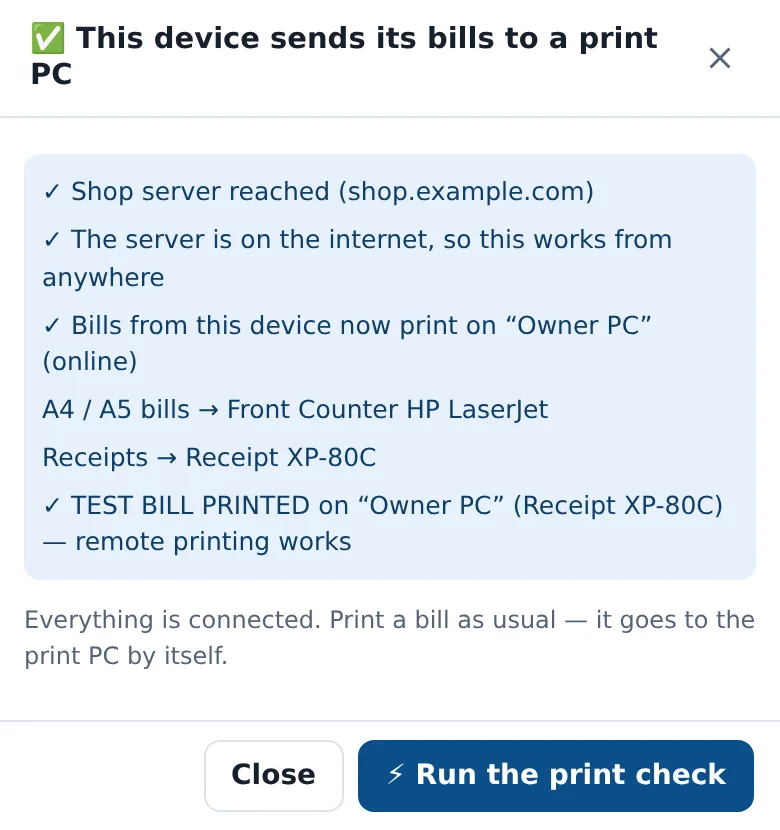
Print bills from your phone or another PC on the shop printer
Make one shop PC your print PC. Phones, other PCs and other counters send their bills to it through your shop server, and the receipt or A4 invoice prints there by itself.
Three taps, then it just works
- On the shop PCPress Smart Check → Set up remote printing. The PC with the printers becomes a print PC and shows ONLINE to every device.
- On the phone or second PCPress the same button. It finds the best online print PC and links to it.
- A test bill printsYou see “Test bill printed” so you know it works before real customers are waiting.
- Thermal receipt printers (58 mm, 80 mm and custom widths), A4 and A5 laser or inkjet, and label printers
- Print from home, another branch or a phone on mobile data when your shop server is online
- The Print Helper collects remote bills even when the POS window is closed
- Failed prints are listed, with the reason, so no bill is lost
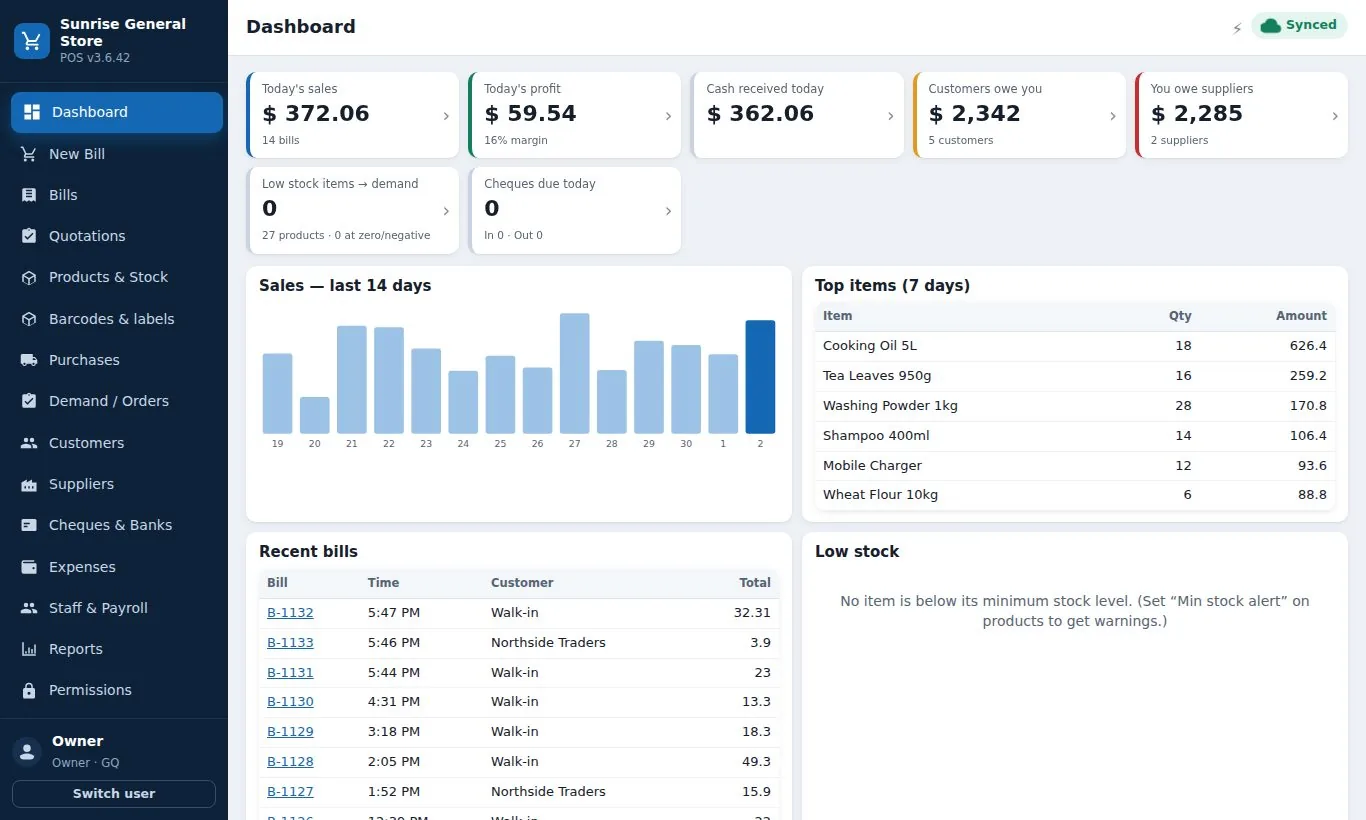
Real screens, not mockups
Clean and quick, so your team can start billing on day one.
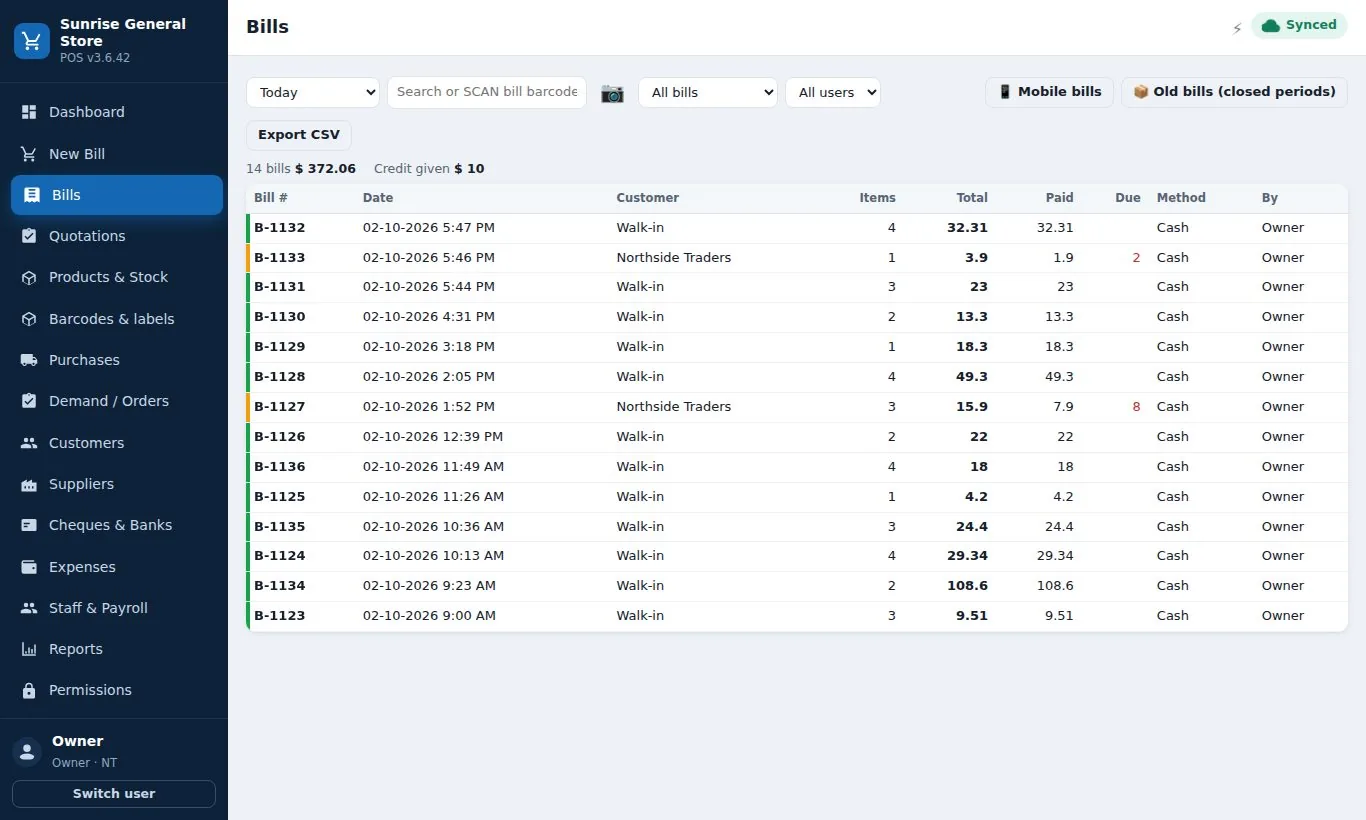
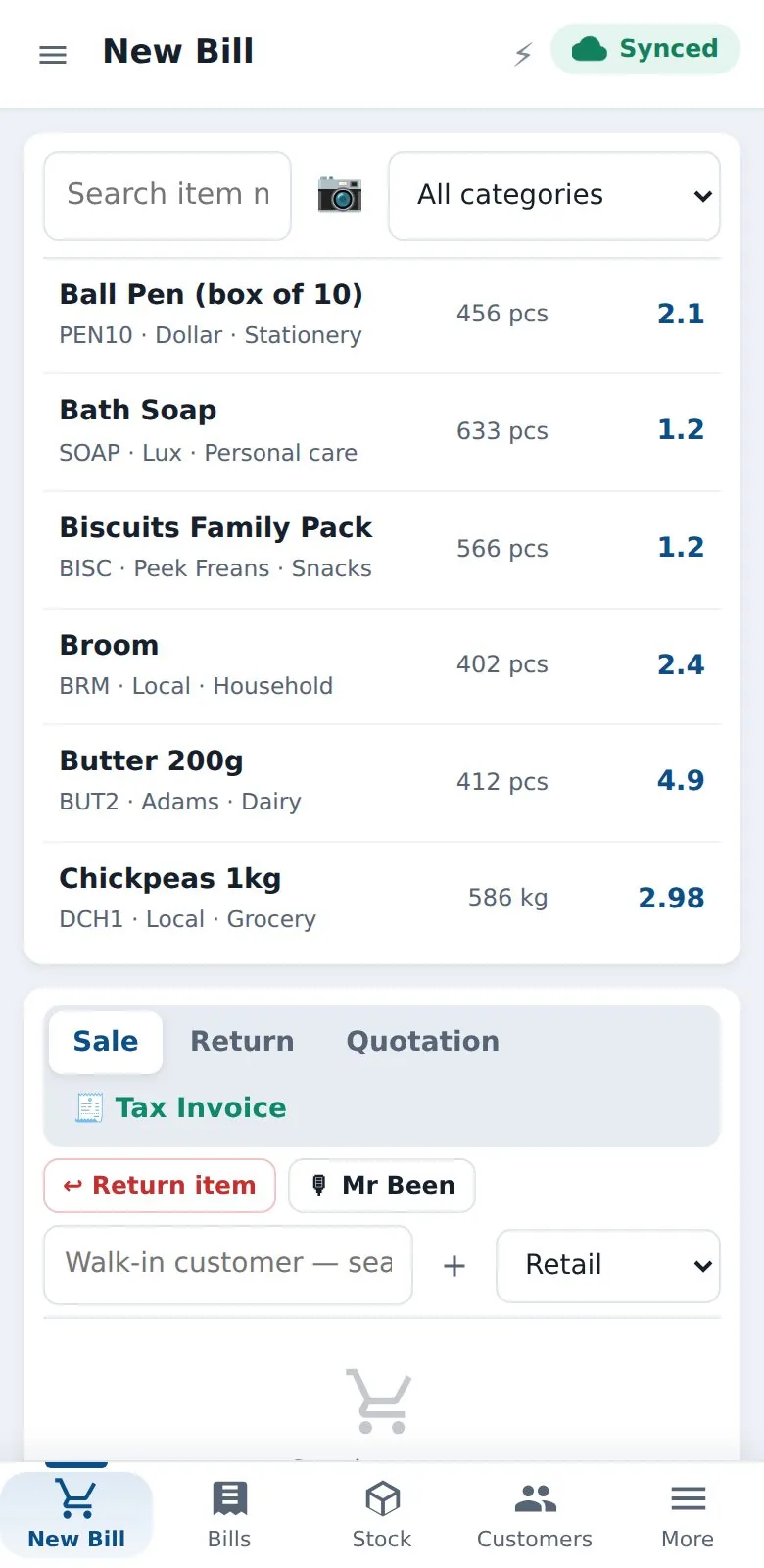
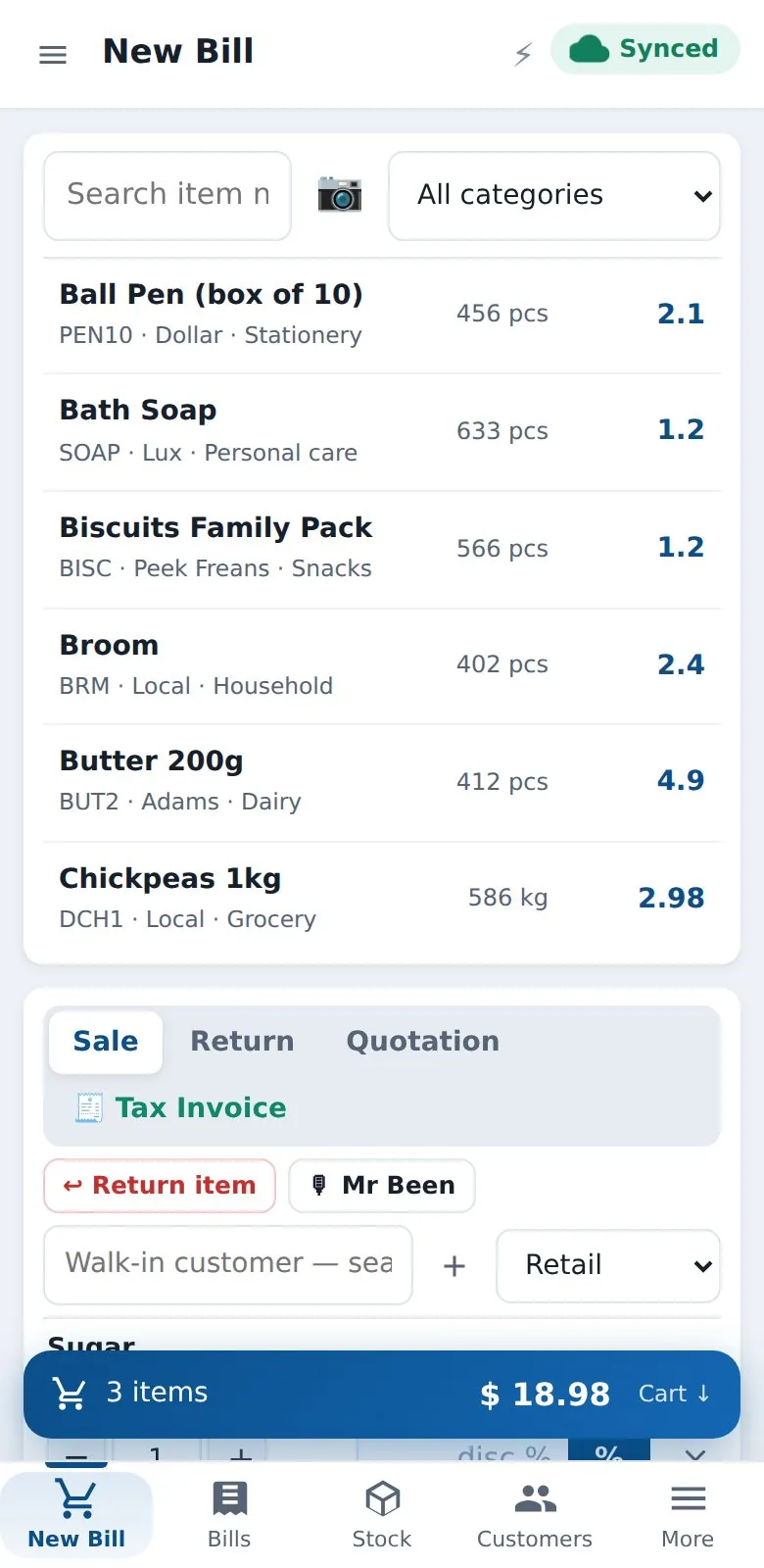
From download to first bill in minutes
No server to set up and nothing else to install.
Download
Get the Windows app and extract the folder.
Open
Your 14-day free trial starts by itself.
Start selling
Add items, make a bill, print it or send it on WhatsApp.
Never stop selling when the internet does
CloudSync POS is offline-first. Every bill is saved on your PC right away, then synced to the cloud and your phone when the connection is back.
- Billing continues during internet outages
- Owner can check sales from a phone
- PC, phone and cloud stay in step automatically
Built to keep your business safe
Your business data is yours. The program itself is protected and licensed.
Why businesses switch to CloudSync POS
A quick look at the difference.
| Paper & Excel | Online-only POS | CloudSync POS | |
|---|---|---|---|
| Works without internet | ✓ | ✗ | ✓ |
| Live stock & low-stock alerts | ✗ | ✓ | ✓ |
| Customer credit & statements | Manual | ✓ | ✓ |
| Cloud sync to phone | ✗ | ✓ | ✓ |
| Barcode & receipt printing | ✗ | ✓ | ✓ |
| Owner can switch a license off | ✗ | Varies | ✓ one click |
| Free 14-day trial | – | Varies | ✓ |
Free online tools for PDF, Word, Excel and photos
Edit PDF, convert PDF to Word, Word to PDF, resize and compress photos, remove objects, make a logo and more. No signup, no upload, works on your phone and PC.
Open Free ToolsSimple plans that grow with you
Start with the free 14-day trial. Choose the plan that fits your business.
Basic
- Billing, receipts & returns
- Stock, barcodes & phone scanning
- Customers & suppliers
- Core reports & Smart Check
- 1 PC + 1 phone · 2 staff logins
Standard
- Everything in Basic
- Quotations & supplier orders
- Cheques & credit accounts
- WhatsApp bills
- Bills in a second language
- 2 PCs + phones (4 devices) · 5 staff logins
Premium
- Everything in Standard
- Staff, salary & payroll
- Premium bill themes & branding
- Up to 5 PCs + phones (10 devices)
- 15 staff logins
Prices in US dollars. Quarterly plans save about 10% and yearly plans give 2 months free. Lifetime includes one year of updates. Special pricing is available in many countries, so message us for a quote. Every plan starts with a free 14-day trial.
Complete POS software for small and growing businesses
CloudSync POS is point of sale (POS) software for shops, supermarkets, wholesalers, salons and spas, workshops, factories, pharmacies, cafés and service businesses. It combines billing software, inventory management, customer credit, barcode scanning and daily profit reports in one app that runs on a Windows PC and on any phone.
Billing and invoicing
Create sale bills, returns, quotations and tax invoices in seconds. Print on a thermal receipt printer or an A4/A5 invoice printer, or send the bill to the customer on WhatsApp. Mixed payments, discounts, advance payments and credit sales are all supported.
Stock and inventory management
Keep live stock for every item, get low-stock alerts, record supplier purchases, print barcode labels and see which products sell best. Scan with a USB barcode scanner or with your phone camera as a barcode scanner, with no extra hardware.
Mobile billing and phone barcode scanner
Open the billing screen on a smartphone, tap the camera and scan EAN, UPC, Code 128, Code 39 or QR codes. The item is added to the bill with its price and stock. Owners can also check sales, profit and who owes money from their phone.
Offline POS with cloud sync
CloudSync POS is an offline POS: billing continues during internet outages and syncs to the cloud and your phones when the connection returns.
Remote printing and Smart Check
Use remote (satellite) printing to print from a phone or another PC on the printer at your main shop PC. Use the Smart Check self-repair assistant to diagnose and fix problems with printing, syncing, stock and settings, without waiting for technical support.
Security and control
The program is encrypted and bound to your licensed PC. Staff roles control what each person sees, and automatic restore points keep safe copies you can roll back to.
Free 14-day trial
Download CloudSync POS for Windows 10 or 11, open it and your free trial starts automatically with no card and no key. Message us on WhatsApp for pricing for your country and business size.
Frequently asked questions
What is CloudSync POS?
CloudSync POS is point of sale software that handles billing, stock, customer accounts and reports for any business. It runs on a Windows PC and on phones, keeps working offline and syncs when the internet is back.
Can CloudSync POS run a restaurant or café?
Yes. Switch on Restaurant mode in Settings. You get a table map, order taking with notes, a kitchen screen with timers, takeaway tokens, delivery with riders and zones, menu and recipes with ingredient stock, reservations and a daily report. It is off by default.
Can it manage a salon or spa?
Yes. Salon & Spa mode has services with time and price, a day view by stylist, a busy-stylist warning, WhatsApp reminders, tips at checkout and monthly stylist commission.
Does it support factories and workshops?
Yes. Factory mode has parts and raw material, bill of materials with cost to make and margin, production runs that move stock, job cards for repair work and scrap tracking.
What are Business modes?
Business modes are optional add-ons inside the same POS: Restaurant, Salon & Spa and Factory. Each one is off by default and adds its own menu when you switch it on in Settings. Switching one off keeps all of its data.
Is CloudSync POS only for shops?
No. It suits any business that bills customers and keeps stock or services: retail shops, wholesalers, salons and spas, workshops, factories, pharmacies, cafés and service businesses.
Does CloudSync POS work without the internet?
Yes. Billing continues offline and changes sync to the cloud when the connection returns. Internet is only needed to start the free trial and to check the license from time to time.
How does the 14-day free trial work?
Download the Windows app and open it. The trial starts automatically with no card and no key. The app shows how many days are left. When the trial ends it locks until you get a license, and your data is kept.
Can I use CloudSync POS on my phone?
Yes. Your license can cover PCs and phones, depending on the plan, so owners can check sales and managers can bill from a phone.
Can I move from another POS or from Excel?
Yes. CloudSync POS can bring across products, customers and balances from many backups and Excel files, so you do not start from zero.
Does it work with barcode scanners and receipt printers?
Yes. It works with common USB and network receipt printers and barcode scanners, and it can print barcode labels for your items.
Can I scan barcodes with my phone camera?
Yes. Open the billing screen on your phone, tap the camera button and point it at the barcode. The item appears with its name, price and stock, and one tap adds it to the bill. No scanner hardware is needed. On Android it uses the phone’s own barcode reader; on iPhone a small reader loads once and is then kept for offline use.
What barcode types can the phone camera read?
Common retail and warehouse codes: EAN-13, EAN-8, UPC-A, UPC-E, Code 128, Code 39, Code 93, ITF, Codabar and QR codes.
What is remote (satellite) printing?
Remote printing lets a phone, a second PC or a person at another location print bills on the printer at your main shop PC. The shop PC becomes a print PC. Other devices send the bill through your shop server and it prints there automatically. One tap in Smart Check sets it up and sends a test bill to prove it works.
What is Smart Check?
Smart Check is the built-in self-repair assistant. It checks the internet, server, sync, storage, clock, printers, permissions and your own stock and balance figures, explains what it found in plain words, and repairs the safe problems with one tap. Nothing is changed until you say so. You can type the problem, or send a screenshot or photo, and it picks the right checks.
Can I print a bill from my phone to the shop printer?
Yes. With remote printing, bills made on a phone print on the receipt or A4 printer at the shop PC, even when you are not in the shop, as long as the shop server is online.
Can I send bills on WhatsApp?
Yes. You can print a receipt or send the bill to your customer on WhatsApp in one tap.
How is my data protected?
The program is encrypted and bound to your licensed PC, staff roles control who sees what, and automatic restore points keep safe copies you can roll back to.
How much does CloudSync POS cost?
Plans start at $12 a month for Basic, $22 for Standard and $39 for Premium, or $32, $59 and $105 a quarter, or $120, $220 and $390 a year, with lifetime options. Special pricing is available in many countries, so message us on WhatsApp for a quote. The first 14 days are free.
Talk to a real person
Questions, a quote for your country, or help getting started? We reply on WhatsApp.
Start your free 14-day trial
On a Windows PC or on your phone: open it and send your first bill in minutes. No card needed.